
Voice AI built for K-12 front offices
Bring every inbound call into a calm, organized front office.
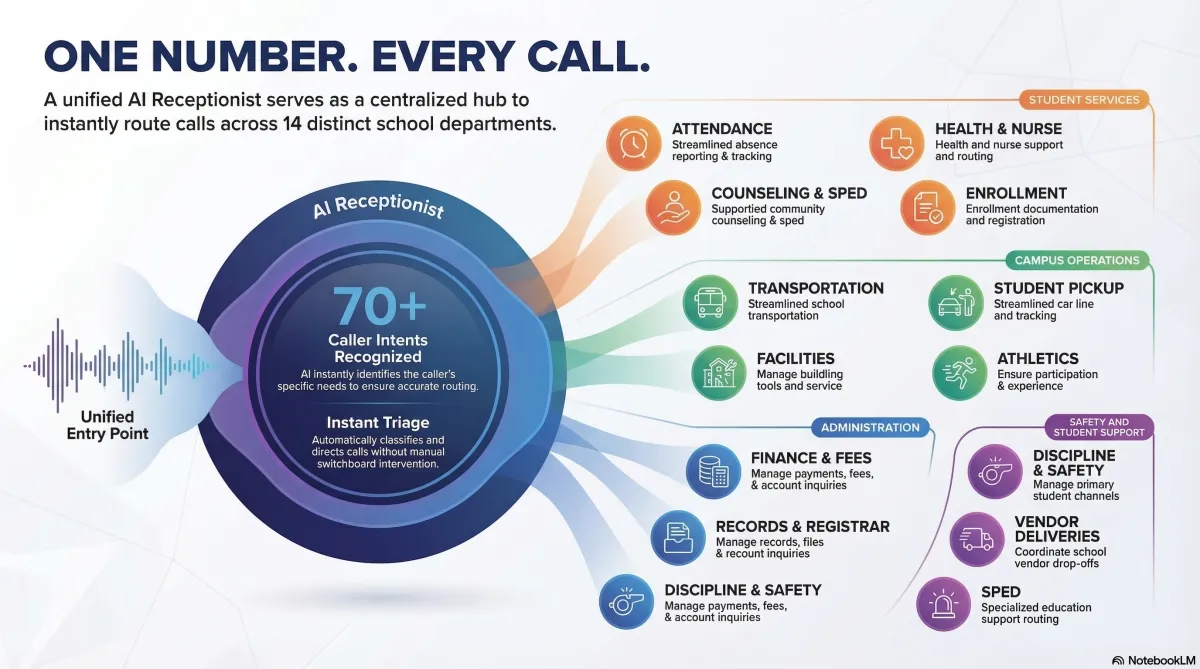
K12 Electronic Front Office is a voice AI receptionist that understands 60+ real-world school call reasons — from absences and bus delays to transcripts and vendor deliveries. It answers, routes, and logs calls 24/7 so your staff can focus on students instead of phone chaos.
Built for K-12 IT & operations: SIP-ready, FERPA-conscious logging, multilingual (English/Spanish) and tailored to your SIS, bell schedule, and routing rules.
What your Digital Secretary can handle on day one
- Attendance: absences, tardies, early pickups
- Transportation: bus delays, missed routes, weather changes
- Front office: hours, calendar, events, directions
- Health: nurse messages, symptoms, medication follow-up
- Records: transcripts, withdrawals, enrollment verification
- Vendors: deliveries, invoices, service calls
Free trial includes a pre-trained intent library mapped to 60+ K-12 call reasons plus a sandbox line to test with your team before going live.
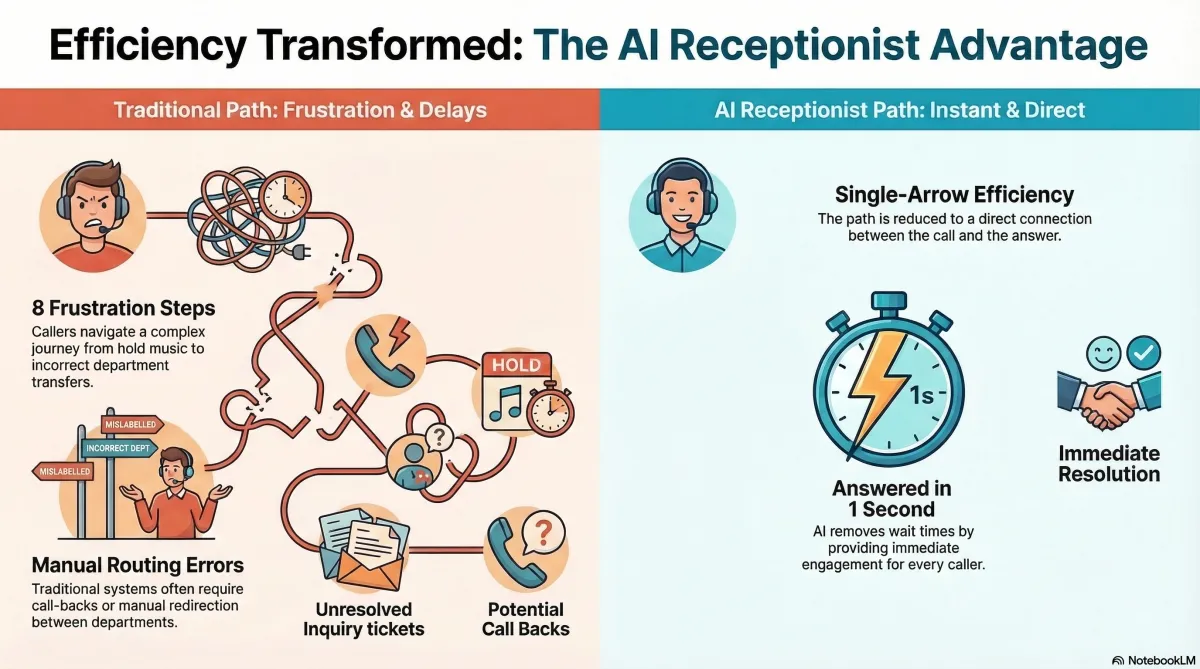
From overwhelmed lines to predictable call flows
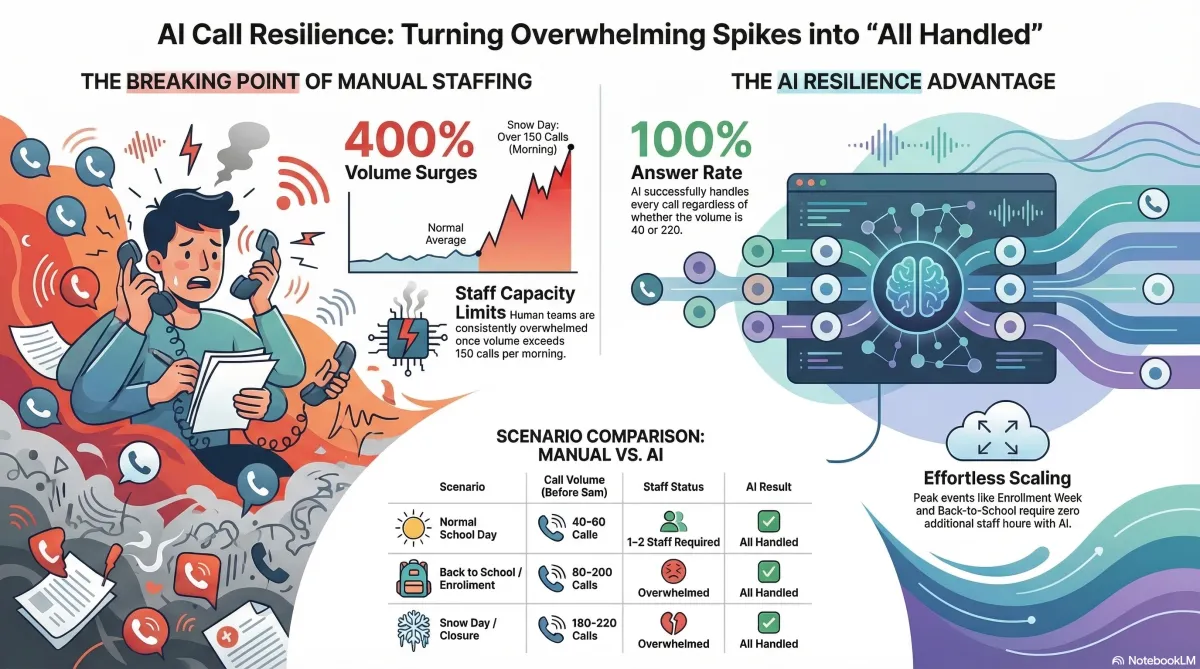
Built for spikes: snow days, bus delays, back‑to‑school, and more.
Give technology and operations teams one controllable system for every inbound call — instead of a patchwork of phone trees, voicemail boxes, and overworked receptionists.
Before: phones on fire
- Hold times explode during weather events, bus issues, and start/end of day.
- Reception and attendance staff constantly interrupted while serving in‑person families.
- Inconsistent routing between buildings, programs, and grade levels.
- Voicemail black holes and missed return calls to parents and vendors.
- IT asked to maintain complex phone trees that age badly and break often.
After: a calm, electronic front office
- AI answers 100% of calls instantly, 24/7, in English or Spanish.
- 70%+ of routine calls resolved without staff: attendance, hours, events, lunch, etc.
- Smart routing to attendance, nurse, transportation, registrar, or counseling.
- Standardized logging and transcripts for compliance and service quality.
- District‑wide configuration from a single console, managed by IT or operations.
Most districts go from first test call to a live pilot with 1–2 campuses in under two weeks.

What your AI receptionist understands
60+ K‑12 call intents, pre‑trained from real front‑office traffic.
Below are just a few of the intent categories your Electronic Front Office can handle out‑of‑the‑box. Each one can be configured to provide information, log a message, or route to the right team instantly.
Main reception & attendance
- School hours, bell schedules, early release days
- Holiday calendar, events, parent‑teacher conferences
- Attendance: absences, tardies, early dismissals
- Drop‑off / pickup and visitor procedures
- Lost & found, general policy questions

Transportation & weather spikes
- Bus delays and "Where is the bus right now?"
- Missed bus, alternate pickup, or route questions
- Eligibility and new rider assignments
- Weather‑related closures, late starts, and route changes
- Special education or wheelchair‑accessible transport
Health, records & support
- Nurse office messages and symptom reporting
- Medication and health record questions
- Transcripts, transfers, withdrawals, enrollment verification
- Counseling, IEP/504, intervention, and college advising
- Discipline follow‑up and safety concerns (with escalation)
Vendors, facilities & finance
- Delivery drivers checking in for food, books, or equipment
- Service providers (HVAC, pest control, copiers) looking for access
- Invoices, PO status, and payment questions
- Facility rentals and community events
- Spam and sales calls automatically filtered or deprioritized
Enrollment & community
- New family enrollment and school choice questions
- Campus tours and shadow days
- Homeschool and out‑of‑district transitions
- Media, government, and alumni inquiries
- Volunteer checks and general feedback
Every category has configurable scripts, verification steps, and escalation paths so technology leaders stay in control of what AI can and cannot do.
Fast, IT‑friendly rollout
From first call to campus pilot in three steps.
Your free trial walks through the same steps we use with districts: configure, simulate real calls, then light up a limited pilot without touching your live main line until you are ready.
Step 1
Connect phones & rules
Point a test DID or pilot campus number to the Electronic Front Office. Import bell schedules, key extensions, buildings, and escalation rules. No district‑wide cutover required.
Step 2
Tune intents to your district
Use our K‑12 intent library as a base, then tailor phrasing for your region, SIS codes, building names, and policies. IT can preview exactly how calls will route before anyone goes live.
Step 3
Pilot, measure, then roll out
Run a live pilot with one or two campuses. Track deflection rates, hold‑time reductions, and escalation patterns. When stakeholders are confident, expand to more schools with the same config.
Why K‑12 tech teams love it
Control, observability, and safety built in.
The Electronic Front Office is designed for technology directors who need reliability and guardrails, not another black‑box AI toy.
- Centralized configuration: manage intents, routing, and prompts across all campuses.
- Live dashboards: see real‑time volumes by intent (attendance, transportation, vendors, etc.).
- Detailed logging: searchable transcripts with time stamps for audits and follow‑up.
- Safety‑first flows: instant escalation to humans for threats, self‑harm, or violence.
- SIP‑friendly: works alongside your existing phone provider and hardware.
Designed for parents, too
Natural, human‑like conversations in English and Spanish. No long phone trees. No "Press 7 for…" menus. Parents get answers in seconds and can call 24/7, even outside office hours.
Modeled on real K‑12 operations
The intent library is built from real receptionist scripts, transportation hotlines, and registrar workflows — not generic call‑center templates. Elementary, middle, and high school patterns are all supported.
Security, privacy, and governance for districts.
The Electronic Front Office is designed with FERPA‑conscious logging and clear boundaries for what the AI can say or do.
- Role‑based access: limit who can change scripts, routing, and escalation logic.
- Configurable retention: align call recordings and transcripts with district policy.
- Verification workflows before sharing student‑specific info when integrated with SIS.
- Safe‑word rules to immediately route high‑risk calls to humans or emergency numbers.
Sample escalation scenario
Parent: "My daughter texted me there is a fight in the parking lot."
AI: immediately classifies as a safety concern, gathers minimal essential info, and transfers to the designated safety contact list with on‑screen context, while flagging the call in analytics.
Integrations: optional connectors for SIS (e.g., PowerSchool, Infinite Campus) enable real‑time verification before confirming attendance status, bus eligibility, and contact information — all under your district’s security model.
Try the Electronic Front Office free with your team.
Spin up a sandbox line where IT, principals, and office staff can call in, trigger snow‑day scenarios, vendor calls, and enrollment questions — and see how the AI responds before you ever touch a real campus main number.
70%+
of routine calls can be fully handled without staff involvement in typical K‑12 deployments.
24/7
coverage for weather days, after‑hours pickups, and vendor deliveries.
2 weeks
to typical first‑campus pilot from initial configuration.
Free K‑12 pilot offer
See your Electronic Front Office in action.
Share a few details and we will provision a sandbox line and starter configuration aligned to your district type (elementary, middle, and high school mix). We will schedule a 30‑minute technical walkthrough with your IT and operations leads.
- No payment method required for the trial.
- Sandbox line for internal testing and demos.
- Pre‑loaded K‑12 intent library and sample scripts.
- Configuration review with our implementation team.
Ideal contacts: technology director, communications lead, or operations leader with phone system access.
Request your free trial
We typically respond within one business day with next steps and a scheduling link.
By submitting, you agree to be contacted about K12 Electronic Front Office. We will not share your information with third‑party advertisers.
Frequently asked questions
If you have a question that is not covered here, include it in the free trial request form and we will address it during the walkthrough.
Does this replace our existing phone system?
No. The K12 Electronic Front Office sits in front of or alongside your existing phone system. You can route specific numbers (like a pilot campus, transportation hotline, or district main line) through the AI receptionist while keeping your carrier, handsets, and internal extensions unchanged.
Can we start with just one school or one department?
Yes. Most districts begin with a single campus or a high‑volume line such as attendance or transportation. During the free trial we help you identify a low‑risk entry point where you can see value quickly and gather feedback before expanding.
How does the AI know when to transfer to a human?
Each intent category (safety, discipline, counseling, health, etc.) has configurable rules. You decide which topics the AI can fully handle, where it should log and email a message, and where it must immediately transfer live to front office, admin, or emergency contacts.
Is this safe for sensitive topics like bullying or self‑harm?
Yes, and these are exactly the types of calls we design escalation paths for. The system is trained to recognize language related to threats, self‑harm, violence, and abuse and will move out of automation mode, capture minimal facts, and connect the caller to your designated human responder.
What happens when there is a snow day or sudden closure?
You can publish a district‑wide status (closed, late start, remote learning, buses on delay, etc.) that the AI announces proactively. Callers asking anything weather‑related will hear the latest status first, dramatically reducing live call volume during those spikes.
K12 Electronic Front Office
AI‑powered reception built specifically for K‑12 districts. Fewer overwhelmed phones. More time for students.
© 2026 K12 Electronic Front Office. All rights reserved.